
Important: Action Required for RemoteApp Functionality
Date: April 15, 2026 - Updated April 16th, 2026
Status: Resolved (Security Update Information)
Microsoft’s April 2026 security update has introduced a new "Connection Security" layer for all RemoteApp services. This is a global Windows change and not a security breach on our servers. Your connection remains fully encrypted and secure. You can read about this Microsoft Patch here.
Services impacted: Simple Cloud, Business Essentials, Virtual 24
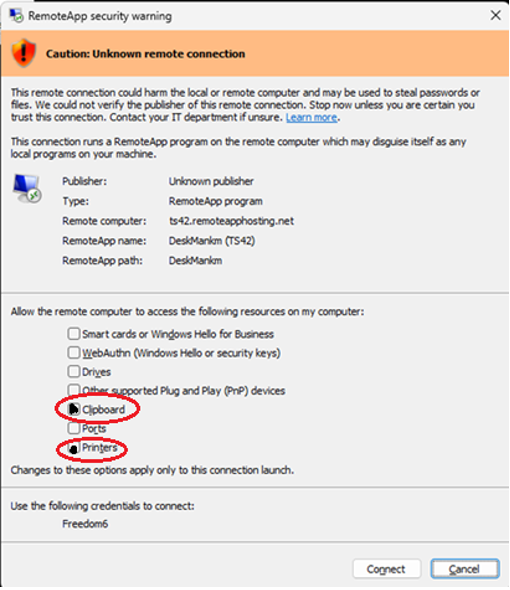
If you are seeing this security warning when connecting, please see the solution below.
Solution 1 (Recommended): Revert Remote App Security Warning to Version 1
RAH has released a script to roll back the RemoteApp Security Warning to Version 1
- Download the script - DOWNLOAD LINK
- Extract the zip file - Password rdpsecversion1
- Right click "rdpsecversion1.bat > Run as administrator
- Reboot, the Remote App connection should be restored to version 1.
Solution 2: Continue to accept the warning prompt
To restore full functionality, you must manually check the following boxes in the new security dialog before clicking Connect:
- [ ] Clipboard: Required to copy and paste text/files between your PC and the RemoteApp.
- [ ] Printers: Required to send documents from the RemoteApp to your local printer.
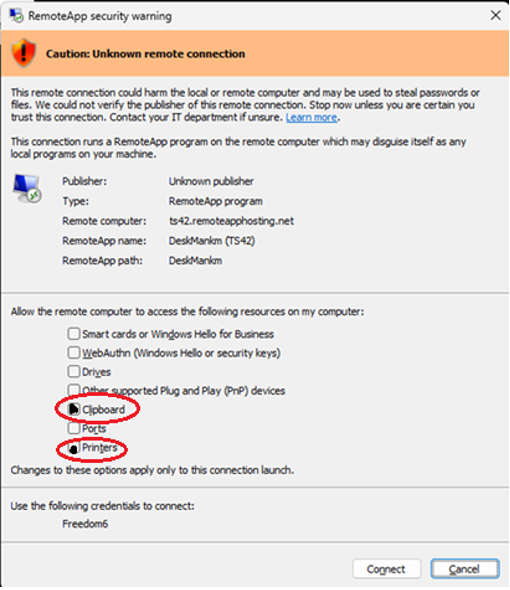
If these options are greyed out, please review this article on the process to reset the check boxes - KB article found here.
Why is this happening?
This is a "Least Privilege" security move by Microsoft. It forces users to explicitly choose what data they share with a remote session. While our servers are secure, Windows now requires you to "opt in" to these features every time you start a session.
The specific patch responsible for this change is KB5083769 (released April 14, 2026).
This is the mandatory cumulative security update for Windows 11 (specifically versions 24H2 and 25H2). If you are on Windows 10, the equivalent update is KB5082200.
Why was this patch released
Microsoft issued this hardening measure primarily to address CVE-2026-26151, a Remote Desktop spoofing vulnerability. This vulnerability allowed attackers to use malicious .rdp files to trick users into unknowingly sharing local drives, clipboards, and authentication tokens with a hostile server.
Patch Details
| OS Version | Knowledge Base (KB) | OS Build |
| Windows 11 25H2 | KB5083769 | 26200.8246 |
| Windows 11 24H2 | KB5083769 | 26100.8246 |
| Windows 11 23H2 | KB5082052 | 22631.6936 |
| Windows 10 (ESU) | KB5082200 | 19045.7184 |
Next Steps
Our IT team will continue to monitor and provide any support that we are able to from our team on the impact of the Microsoft change. Note that this is a client-side change, and we have limited control of end-user devices.
For immediate assistance, please reach out to the IT Support Team.
Email: support@remoteapphosting.com


